

FonVex is a lightweight collection of command-line tools designed to bring interactive user experiences to the terminal. It allows developers to easily display menus, forms, file/folder browser dialogs, and multi-select prompts directly from the command line.
Part of the FonVex software package FVSelect
 FVForm
 FVChoose
 FVBrowse
You can download the tools from this website or visit the FonVex GitHub page.

Features
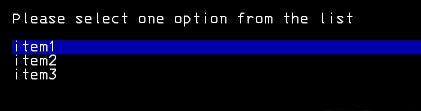
Select
Select displays a structured menu in the terminal and lets users choose a single item. Ideal for guiding decisions with keyboard navigation in CLI workflows.
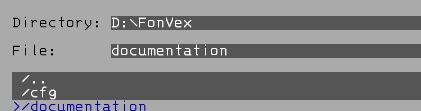
Browse
Browse opens an interactive file or folder browser in the terminal. Users can easily select files or folders without typing paths manually.
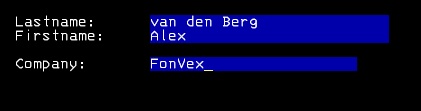
Form
Form renders interactive forms based on a definition file. Collect structured input through multiple fields directly from the command line.
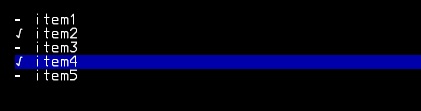
Choose
Choose presents a list of options with checkbox-style selection. Perfect for selecting multiple items in a clear and intuitive way.
Getting Started
Getting started with FonVex is straightforward and developer-friendly.
FonVex is built to fit naturally into existing command-line tools, scripts, and automation workflows without adding unnecessary complexity.
Each FonVex tool focuses on a single purpose—selecting items, collecting input, choosing multiple options, or browsing files—making it easy to pick exactly what you need. You don’t have to learn a large framework or adopt a new way of working. If you are comfortable with the command line, you are already most of the way there.
First, thank you for being interested in contributing to FonVex. toolset is free, open source project driven by its original author Alex van den Berg. As such, your contributions are greatly welcome.
Download the complete set or one tool from my GitHub page.
Report Bugs

And remember: the more information we get the easier we can reproduce and fix it.
Report a bug →
Changelog
Version 1.0.0 (Current Version)| Added | First release of FonVex |
Meet the developer

Alex van den Berg
Hi, I'm Alex developer and creator of FonVex, a toolkit for interactive CLI applications.Don't forget to check out my other projects or websites
My portfolio
Audiostation